> For the complete documentation index, see [llms.txt](https://docs.funzy.vn/llms.txt). Markdown versions of documentation pages are available by appending `.md` to page URLs; this page is available as [Markdown](https://docs.funzy.vn/fid-verify-token/how-to-verify-fid-token.md).
# How to verify FID token
### Struct of a normal token
A JWT is combined from 3 parts, separated by period ‘.’ character. All three parts are base64url-coded (not base64) of actual data.
```
base64url(header).base64url(payload).base64url(signature)
```
header: JSON object reposent signature algorithm, keyid. Example:
```
{
"alg": "RS256",
"kid": "A15AAA8208D664A3C3D7A6CE1F04501381048B29RS256",
"x5t": "oVqqggjWZKPD16bOHwRQE4EEiyk",
"typ": "at+jwt"
}
```
Fid currently uses the “RS256” algorithm.
payload: JSON object with JWT claims. Example:
```
{
"iss": "https://id.ftech.ai",
"nbf": 1659408417,
"iat": 1659408417,
"exp": 1659412017,
"aud": "https://id.ftech.ai/resources",
"scope": [
"email",
"fid-api:id",
"openid",
"phone",
"profile",
"offline_access"
],
"amr": [
"pwd"
],
"client_id": "stress.test",
"sub": "1002",
"auth_time": 1659408417,
"idp": "local",
"sid": "51be0330396d498a89f26e705b8f0421"
}
```
signature: Signature of first two parts of the JWT, using algorithm and key from header. With “RS256” algorithm, signature can be computed as follow:
```
signature = RSA( SHA256( base64url(header).base64url(payload) ))
```
RFC:
### Step to verify JWT
* Preparing: Get certificates from authority. In OIDC, certificates can be obtained from an jwks url, which defined from oidc configuration. Example:
* Authority: `${domain}`
Product:
Develop: [https://id-dev.ftech.ai](https://id.ftech.ai)
* Configuration = {authority}/.well-known/openid-configuration `${domain}`[/.well-known/openid-configuration](https://id.ftech.ai/.well-known/openid-configuration)
* JWKS url is value of jwks field in the configuration: `${domain}`[/.well-known/openid-configuration/jwks](https://id.ftech.ai/.well-known/openid-configuration/jwks)
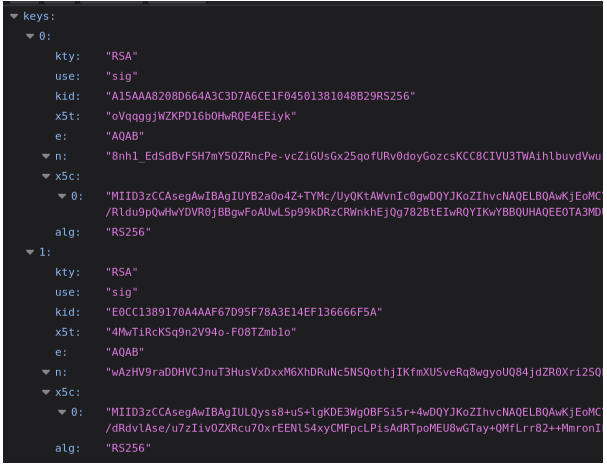
Example jwks:
An authority can have multiple certificates and can be changed at most 2 times per day. A recommended way is to cached jwks and refresh once per 1 hour.
Using [firebase/php-jwt](https://github.com/firebase/php-jwt) library to cached public keys:
Attn: data from jwks are in x509 certificate format. Some library only accept public keys, verifier can extract key from certificate using openssl library:
* Check expiration time: check if “exp” claim in payload is not later than current time,
* Check authority: check if “iss” claim in payload is a valid authority. The list of valid authorities can be configured before,
* Verify signature:
* * Check if algorithm is RS256,
* Check if “kid” field in header is from certificates cache. If the authority has multiple certificates, pick the one with same “kid”,
* Use the certificate to verify signature, i.e check if
```
SHA256(base64url(header).base64url(payload)) == RSA-Decode(signature)
```